
Inside the Digital Bouncer: How Antivirus Works in 2026
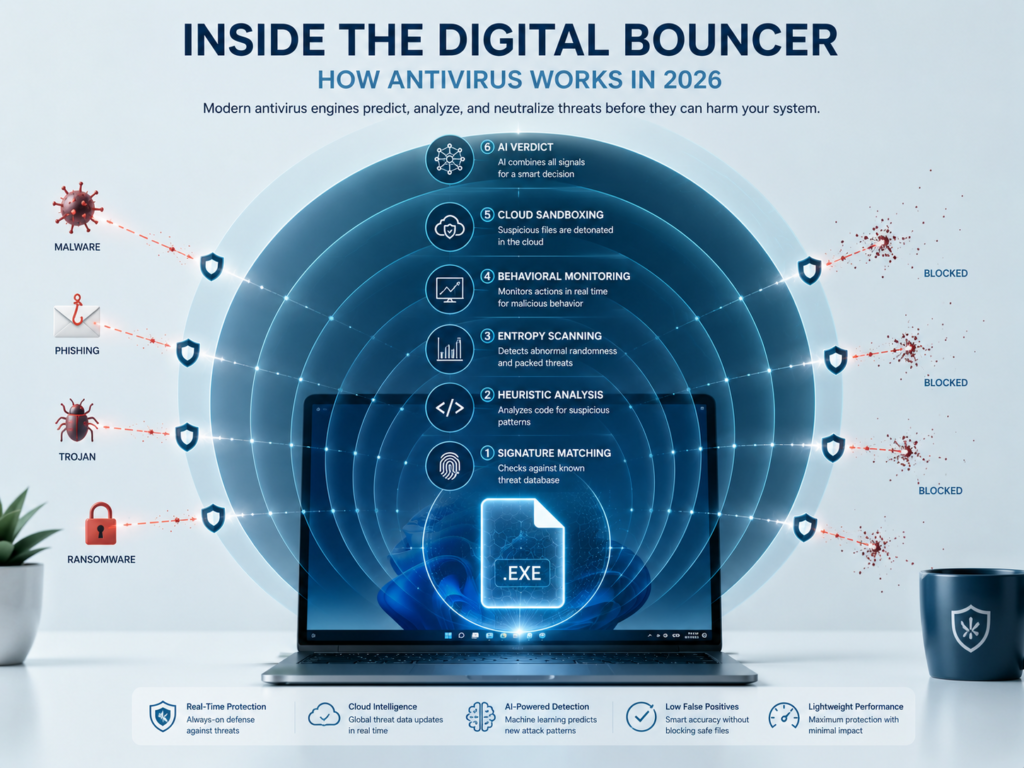
Your antivirus does far more than scan files. Modern security engines predict threats before they execute — using AI, cloud sandboxing, and entropy analysis. Here’s exactly how it works.
🕐 8 min read📅 Updated May 2026 🎯 Technical Guide
Definition
Antivirus software works by continuously monitoring your device for malicious code using multiple detection methods — including signature matching, behavioral analysis, and AI-powered heuristics. In 2026, most engines also offload suspicious files to cloud sandboxes for detonation testing before allowing them to run.
Quick Answer
Modern antivirus uses a layered system: it first checks file signatures against known threats, then analyzes behavior and code patterns in real time. If a file looks suspicious but isn’t in any database, it gets sent to the cloud and safely “detonated” in a virtual environment. AI reduces false alarms while entropy scanning catches ransomware before any encryption begins.
What “Antivirus” Actually Means Today
The term “antivirus” is a 30-year-old name for a tool that barely resembles its origins. The first AV programs in the late 1980s were simple: they held a list of known virus fingerprints, scanned your files, and flagged exact matches. Simple, effective against old threats — and completely useless against modern ones.
Today, antivirus is better described as a threat prediction engine. Instead of only recognizing malware it has already seen, a modern AV tries to predict malicious intent from code it has never encountered before. This shift from detection to prediction is the single most important development in endpoint security over the past decade.
That “AI-powered” label on your antivirus marketing page? It’s not purely hype. Machine learning genuinely changed how these tools operate — though the full picture is more nuanced than most guides explain.
Why Understanding This Actually Matters
Most users treat antivirus as a black box — it either flags something or it doesn’t. But understanding the mechanics helps you make better decisions:
- You’ll understand why your AV uses significant CPU and RAM during full scans — and what it’s actually doing during that time.
- You’ll know why a zero-day threat can slip past even a premium product, and what to do about it.
- You’ll be able to evaluate marketing claims like “AI-powered” or “cloud-based” with a critical eye.
- You’ll understand why free and paid engines behave differently — especially around the quality of heuristic databases.
Key Insight
No antivirus offers 100% protection. What separates good products from great ones is how fast they detect unknown threats, how accurately they distinguish genuine malware from safe files, and how quickly their cloud intelligence updates.
How Antivirus Works: Step by Step
When a file arrives on your machine — whether through a download, email attachment, USB drive, or network share — your antivirus processes it through several detection layers simultaneously. Here’s the sequence:
- Signature Matching (Layer 1 — Milliseconds)The file’s unique hash (a mathematical fingerprint) is checked against a local database of known malware signatures. If it matches a known threat, it’s blocked immediately. This layer is fast but only catches malware that has been catalogued before.
- Heuristic Analysis (Layer 2 — Fast)The code structure is analyzed for patterns typical of malware — suspicious API calls, self-modification routines, obfuscated strings. The AV doesn’t need a signature; it looks for behavioral DNA that resembles known attack types.
- Entropy Scanning (Layer 3 — Passive)The engine measures the “randomness” of data within the file. Highly encrypted or compressed data generates abnormally high entropy — a strong indicator of packed malware or ransomware preparing to encrypt your files. No signature needed.
- Behavioral Monitoring (Layer 4 — Continuous)Even after a file passes initial checks, the AV watches what it actually does at runtime. If a program suddenly starts reading the registry, spawning child processes, or accessing sensitive system files, the engine flags it — even if nothing looked wrong on disk.
- Cloud Sandbox Detonation (Layer 5 — When Uncertain)If a file is unrecognized and suspicious, many premium engines upload a copy to an isolated cloud environment where it is safely executed (“detonated”). The AV observes what the file actually does — without any risk to your real system. Results feed back in seconds.
- AI Verdict & Local Action (Layer 6 — Decision)All signals are combined by an AI model trained on millions of threat samples. The engine issues a verdict: allow, quarantine, or block. The confidence threshold for each action has been tuned to balance protection against false positives.
Deep Dive — The Cloud Sandbox
Your Files Are Sometimes “Detonated” in a Virtual Cloud
This is one of the least understood features in modern antivirus — and one of the most powerful. When your antivirus encounters a file it has never seen before and can’t confidently classify, it may upload that file to the vendor’s cloud infrastructure.
There, the file is executed inside a fully isolated virtual machine — a sandbox — with no connection to real systems. The cloud environment records every action the file takes: which registry keys it reads, which network connections it attempts, which files it creates or modifies. All of this happens in milliseconds from your perspective.
The verdict comes back to your local engine before the file is allowed to execute on your actual machine. This is why some AVs show a brief “analyzing” state on first encounter with certain files — they’re waiting for the cloud result. It’s also why premium antivirus products require a constant internet connection to function at full capability. Without cloud access, they revert to local heuristics only.
Deep Dive — Entropy Analysis
The Math That Catches Ransomware Before It Strikes
Entropy, in information theory, measures how random or unpredictable data is. Normal executable files have predictable structure — code sections, data sections, readable strings. Legitimate compression (.zip, .7z) raises entropy, but in a recognizable, structured way.
Malware authors often pack their code — encrypting or compressing the payload to avoid signature detection. The result is a file with abnormally high, uniform entropy across its entire structure. Modern AV engines measure this and use it as a red flag. A file that is 98% high-entropy data with no readable strings is extremely suspicious, even if it matches zero known signatures.
For ransomware specifically, entropy analysis works in the opposite direction too: when a process begins producing high-entropy output files rapidly — a sign that it’s encrypting your documents in real time — behavioral monitoring combined with entropy detection can halt the attack before more than a handful of files are lost. This is one of the key reasons why real-time protection must always remain enabled.
The Detection Methods at a Glance
Signature Detection
Matches file hashes against a database of known malware. Fast and precise, but blind to new threats.
Behavioral Analysis
Monitors what programs actually do at runtime — not just what they look like on disk.
Heuristic Scanning
Analyzes code structure for attack patterns — no exact signature required.
Cloud Sandbox
Detonates suspicious files in an isolated virtual environment before they touch your real system.
Entropy Analysis
Measures data randomness to detect packed malware and ransomware activity without any signature.
AI / ML Models
Combines all signals into a final verdict, trained on hundreds of millions of threat samples.
Deep Dive — The False Positive Dilemma
Why “Working Well” Sometimes Means Blocking Safe Files
Here’s a paradox that most guides skip: a more aggressive antivirus engine will catch more threats — and also block more legitimate software. This is the false positive problem, and it’s one of the hardest engineering challenges in security.
When an AV flags a safe file as malicious, it’s called a false positive. These happen because heuristic rules and AI models work with probabilities, not certainties. A custom-built script, an unsigned open-source utility, or a legitimately packed installer can all look suspicious to an engine trained on malware patterns.
In 2026, the best AV vendors use a three-pronged approach to reduce false positives without weakening detection: reputation scoring (files with millions of clean installations are trusted faster), AI feedback loops (user reports of incorrect blocks retrain the model automatically), and allowlist integration (major software publishers are pre-verified). The result is that premium engines catch more threats while triggering fewer false alarms than their free counterparts — a gap that’s directly linked to investment in heuristic database quality and cloud infrastructure.
Related Guide
Free vs Paid Antivirus: Does It Actually Matter? The quality of heuristic databases and cloud sandbox infrastructure is the core difference between free and paid engines. See the full comparison →
Common Misconceptions About How Antivirus Works
Misconception 1: “More scans = better protection”
Full disk scans are useful occasionally, but they’re not the core protection mechanism. Real-time behavioral monitoring and cloud analysis happen continuously and automatically — they don’t require you to manually trigger a scan. Running daily full scans mostly wastes CPU cycles on files that haven’t changed.
Misconception 2: “If my AV doesn’t flag it, it’s safe”
No engine has 100% detection. A zero-day exploit — malware that has never been seen before by anyone — can pass through all detection layers temporarily. This is why OS-level defenses (like Windows Defender’s exploit protection and controlled folder access) exist as a secondary line of defense.
Misconception 3: “Antivirus slows your computer permanently”
Heavy resource usage during a full disk scan is expected and temporary. Modern AVs are optimized to run lightly in the background during normal use — the “always-on” footprint of a well-built engine in 2026 is minimal on any machine made in the last five years. If your AV is consistently hammering CPU at idle, check for scheduled full scans or consider whether the product is well-optimized.
Misconception 4: “Free antivirus is basically the same”
For signature detection of known threats, free engines perform comparably. Where the gap widens is in heuristic database depth, cloud sandbox quality, and AI model training data — all of which require sustained investment. The practical difference shows most clearly in detection of brand-new, never-seen-before threats in the first 24–72 hours after they appear.
Important Note
Turning off real-time protection — even temporarily — removes your most important defense layer. The behavioral and entropy monitoring that catches ransomware mid-execution only works when real-time protection is active.
What You Should Actually Do
Understanding the mechanics leads to practical takeaways that most guides skip:
- Keep real-time protection always on.This is not optional — it’s the layer that catches threats at runtime, before damage occurs.
- Ensure cloud connectivity for your AV.If your AV can’t reach its cloud infrastructure, it’s operating at reduced capability. This matters especially on corporate networks with strict firewall rules.
- Don’t stack multiple AVs.Two real-time engines fighting over the same files cause more problems than they solve. One well-chosen product is better than two conflicting ones.
- Treat quarantine as a holding area, not a verdict.Quarantined files can be false positives. Review them before permanent deletion, especially if software suddenly stopped working after a scan.
- Complement your AV with OS-level protections.On Windows 11, Controlled Folder Access blocks ransomware from modifying protected directories — this works even if the AV misses the initial detection.
Which Engines Use These Techniques in 2026?
Not all antivirus engines implement every layer described above. Here’s how the major tiers differ in practice:
| Feature | Free Tier | Paid Tier |
|---|---|---|
| Signature Detection | ✓ Included | ✓ Included |
| Basic Heuristics | ✓ Basic | ✓ Advanced |
| Behavioral Monitoring | Limited | ✓ Full |
| Cloud Sandbox Detonation | Rarely included | ✓ Core Feature |
| Entropy Analysis | Varies by vendor | ✓ Most Premium AVs |
| AI False Positive Tuning | Basic model | ✓ Continuous Retraining |
| Zero-Day Detection Speed | Slower (local only) | ✓ Cloud-Accelerated |
Related Guide
Does Windows 11 Need Antivirus in 2026? Windows Defender has improved significantly — but does it implement the same cloud sandbox and entropy layers as premium alternatives? We break it down.
Frequently Asked Questions
It’s both. Machine learning genuinely powers the heuristic and behavioral detection layers in most premium engines — it’s how they recognize new threat patterns without requiring exact signatures. However, the term “AI” is also used loosely in marketing. Specifically, look for mentions of cloud-based ML models, behavioral analysis, and dynamic detection to distinguish substance from buzzword usage.
During a full disk scan, the engine reads every file, computes its hash, analyzes its code structure via heuristics, and potentially checks cloud reputation for unrecognized files. That’s computationally intensive. Most modern AVs let you schedule scans during idle time and limit CPU usage percentage — check your settings to prevent scans from interrupting work.
A zero-day is a threat that has never been seen before — it has no signature in any database. Antivirus can still detect zero-days through behavioral analysis, entropy scanning, and cloud sandboxing, but there’s always a detection window. Premium engines typically identify zero-days faster due to better cloud infrastructure and larger ML training datasets.
Most enterprise and premium AV engines send suspicious file metadata (hashes, structural properties) rather than full file contents. When full files are uploaded for cloud sandbox analysis, reputable vendors have strict data handling policies — the files are typically analyzed and discarded, not stored. You can usually review and limit cloud submission behavior in your AV settings.
Real-time protection is the continuous, always-on component of antivirus — it monitors files as they’re accessed, created, or executed. Full scans are a separate, periodic function. Disabling real-time protection and relying on manual scans leaves you unprotected against ransomware and drive-by downloads between scan intervals.
Through a combination of behavioral monitoring and entropy analysis. When a process begins reading large numbers of user files and producing high-entropy (encrypted) output at speed, the AV’s behavioral engine recognizes this pattern as ransomware activity. The process is halted and quarantined — ideally before more than a small number of files are affected.
Final Takeaway
Modern antivirus is not a simple file scanner. It’s a layered prediction system that combines signature databases, behavioral monitoring, entropy mathematics, cloud detonation, and AI-driven verdicts — all running simultaneously in the background.
The shift from detection to prediction is what separates 2026 security tools from their predecessors. Signatures remain important, but they’re just the first checkpoint. The real heavy lifting happens in real-time behavioral analysis and cloud infrastructure — which is precisely why the gap between free and paid engines is most visible against new, unknown threats.
If your goal is to evaluate which antivirus product gives you the best coverage for your specific needs, the next step is comparing how these engines actually perform in independent testing — not just reading marketing pages.