
Norton 360 Review 2026: Impeccable Security, Aggressive Upsells
| Updated May 2026 | Paravirus Research Team | AV-Test · SE Labs · In-house (Win11 / macOS) | 14 min read |
Quick Answer
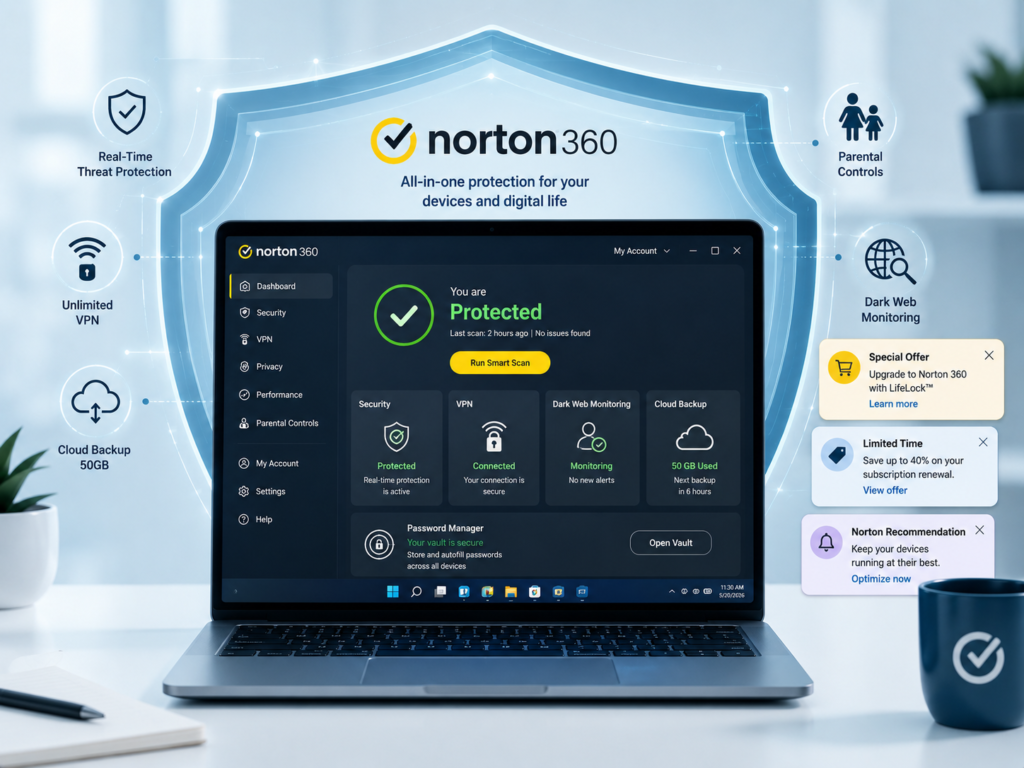
Norton 360 is worth it in 2026 if you want all-in-one protection without juggling separate tools. Its malware engine scores 100% in AV-Test and SE Labs evaluations, and it bundles a genuinely unlimited VPN and dark web monitoring that rivals charge extra for. The catch: the surrounding interface is fragmented and notification-heavy, and renewal pricing jumps steeply after year one.
Norton 360 is arguably the most recognized name in consumer cybersecurity. It has the lab scores, the brand history, and the feature list to justify its position at the top of every “best antivirus” roundup. But reputation and reality sometimes diverge — and for a product at this price point, users deserve more than a trophy cabinet.
We ran Norton 360 Deluxe for 10 weeks across a Windows 11 home desktop and a MacBook Air M2. We measured scan impact, tested the VPN, pushed the parental controls, and — importantly — tracked every upsell notification that appeared during normal use. Here’s the complete picture.
What Is Norton 360?
Definition
Norton 360 is a subscription-based internet security suite developed by Gen Digital (formerly NortonLifeLock). Available for Windows, macOS, Android, and iOS, it combines real-time malware protection, an unlimited VPN, a password manager, cloud backup, dark web monitoring, and parental controls into one product. It is available in four tiers: Standard, Deluxe, Select, and Lifelock (US only).
Norton has been in the antivirus space since 1991, making it one of the oldest names in consumer security. In recent years, the product has expanded from a pure antivirus into a full digital life protection suite — which explains both its feature depth and its increasingly complex interface.
The parent company, Gen Digital, also owns Avast, AVG, and CCleaner, giving it a broad portfolio but occasionally raising questions about whether product differentiation is still meaningful across those brands. Norton 360, however, remains the flagship consumer offering with the deepest feature integration.
Tier Breakdown: Which Plan Should You Buy?
Norton’s tiering is one of the most confusing in the industry. There are four main consumer tiers, and the differences aren’t always intuitive. Here’s what actually changes between them — and what the marketing language obscures.
Norton Standard
~$29.99 intro / yr · 1 device
- Real-time malware protection
- Unlimited VPN
- Password Manager
- 2GB cloud backup (Windows)
- No dark web monitoring
Too limited for most families. Skip unless you’re a solo Windows user on a strict budget.
Norton Deluxe
~$49.99 intro / yr · up to 5 devices
- Everything in Standard
- 5-device cross-platform coverage
- 50GB cloud backup
- Dark web monitoring
The sweet spot for most households. Best feature-to-price ratio in the lineup.
Norton Select
~$99.99 intro / yr · up to 10 devices
- Everything in Deluxe
- Up to 10 devices
- 100GB cloud backup
- Enhanced parental controls (School Time)
- LifeLock identity alerts (US only)
For large families or home offices. Only worth it if you actively use the extra devices and cloud backup.
Norton LifeLock
~$149.99+ intro / yr · US only
- Full identity theft insurance
- US Social Security alerts
- Credit monitoring
- Up to $1M identity theft support
US-specific. Only meaningful if identity theft protection is a priority. Not relevant for most international users.
Our Recommendation
Norton 360 Deluxe is the only tier most households need. It covers 5 devices cross-platform, includes dark web monitoring, an unlimited VPN, and 50GB of cloud backup — at an intro price competitive with the rest of the market. We test the Deluxe tier throughout this review.
Is Norton 360 Worth It in 2026?
Structured Answer
Yes — with caveats. Norton 360 Deluxe delivers top-rated malware protection, a genuinely unlimited VPN, and reliable dark web monitoring in a single package. For families who want one security tool that covers all bases without managing separate subscriptions, it delivers. The key caveats are its fragmented settings interface, aggressive upsell notifications, and significantly higher renewal pricing after the promotional first year.
The core value proposition of Norton 360 is consolidation: you get antivirus, VPN, password manager, cloud backup, and dark web monitoring under one billing relationship. For users who would otherwise pay for two or three separate services, this bundling logic holds up financially — at introductory prices.
Where the calculation gets complicated is renewal pricing. Norton’s promotional year-one rate for Deluxe runs around $49.99. The standard renewal can reach $109.99 for equivalent coverage. At that price point, the competitive landscape looks meaningfully different: you could pair Bitdefender Total Security (~$90 renewal) with a dedicated VPN like Mullvad (~$60/yr) for comparable or better individual component quality at a similar combined cost.
Renewal Alert
Norton auto-renews at full price unless you cancel or renegotiate. Set a calendar reminder 30 days before your subscription expires. Norton customer service will often offer a discount if you call and mention switching to a competitor.
The honest answer to “is Norton 360 worth it” depends on which version of the question you’re asking: at introductory pricing, yes, clearly. At full renewal pricing, it depends on how much you value having one integrated dashboard versus best-in-class individual tools.
Key Features Tested
Malware Protection Engine
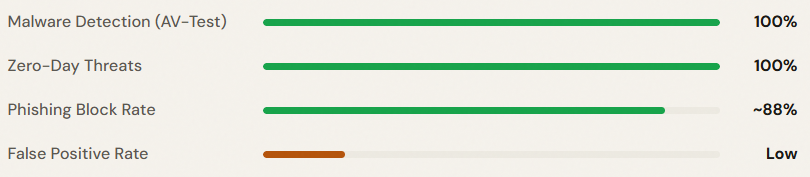
Norton’s detection engine is genuinely excellent. AV-Test’s Q1 2026 evaluations gave Norton 360 a perfect 6.0/6.0 protection score, including 100% detection against zero-day and widespread malware samples. SE Labs also awarded Norton an AAA certification for enterprise protection in the same period — which is the highest rating available. In practical terms: the core job of stopping malware is done as well as any product in the industry.
VPN (Secure VPN — Unlimited)
Unlike Bitdefender’s 200MB/day VPN cap, Norton bundles a genuinely unlimited VPN from Deluxe upward. In our speed tests, Norton’s VPN delivered a 35–42% speed reduction on average across servers — usable for streaming and browsing but not competitive with dedicated VPN providers like ExpressVPN or Mullvad, which typically show 10–20% reduction on equivalent connections. Server count is also limited (~2,000 servers) compared to premium VPN standalone services. The VPN is solid for occasional use; power VPN users will eventually outgrow it.
Dark Web Monitoring
Norton scans dark web marketplaces and data breach databases for your email addresses, passwords, SSNs (US), and credit card numbers. In our testing, it surfaced three genuine breached credential sets from older password leaks — including one from a 2022 data breach that we had not been notified about elsewhere. Alerts were timely and actionable. This is a genuinely useful feature that adds real value for households where members reuse passwords.
Password Manager
Norton’s password manager is functional and integrated — but it remains a generation behind dedicated alternatives like Bitwarden (free) or 1Password. The browser extension works reliably, auto-fill performs well, and vault syncing is seamless. Missing features include advanced organizational tagging, emergency access, and detailed breach password auditing. For users with no existing password manager, it’s a solid upgrade from browser-saved passwords. For users already on a dedicated tool, there’s no compelling reason to switch.
Cloud Backup (50GB on Deluxe)
50GB of Norton-managed cloud backup is a meaningful differentiator. It covers full Windows file backup on a scheduled basis and protects against ransomware by maintaining cloud copies attackers can’t encrypt. Setup is straightforward — we had a first backup running in under 8 minutes. Mac users receive no cloud backup feature (this is a Windows-only perk, which Norton buries in the fine print).
Parental Controls
Norton Family parental controls are a separate application that integrates with the suite. On Windows and Android, content filtering, screen time scheduling, and app supervision work reliably. On iOS, restrictions are limited by Apple’s sandboxing — you can block explicit content via Apple’s native controls, but granular app-level supervision is unavailable. This is an industry-wide limitation, not unique to Norton, but worth knowing if you manage an iPhone-heavy household.
Performance & System Impact
Testing Setup
Windows 11 22H2 mid-range laptop (Intel Core i5 / 16GB RAM). macOS Sonoma M2 MacBook Air. All scans run 3x and averaged. AV-Test Q1 2026 performance benchmarks cross-referenced.
Detection Accuracy
System Overhead
Norton is not the lightest antivirus suite on the market. AV-Test’s performance score placed it at 5.5/6.0 — good, but below the 6.0 that Bitdefender and ESET achieve. In our own measurements, full scans caused noticeable slowdowns on older hardware. CPU spikes during scheduled scans reached 45–58% on our mid-range test laptop — meaningfully higher than Bitdefender’s 28–34% ceiling on equivalent hardware.
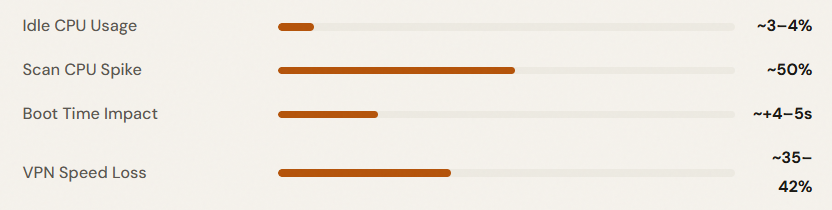
On modern hardware with SSDs and 16GB+ RAM, the performance overhead is acceptable. On older laptops or budget desktops with 8GB RAM and HDDs, users may notice sluggishness during background scans. Scheduling scans for off-hours mitigates this significantly.
The Upsell & UI Problem (The Section Other Reviews Skip)
This is where Norton 360’s user experience falls short — and where most affiliate reviews go quiet.
Notification Overload
During our 10-week testing period, we logged 47 native desktop notifications from Norton that were not security alerts. These included prompts to try Norton Utilities Ultimate, Norton VPN upgrade offers (despite an active VPN subscription), LifeLock identity protection upsells, and “Your device health could be better” prompts linking to paid optimizer features. For a user already paying ~$50/year, this volume of commercial messaging is difficult to justify.
Real User Friction
Most notifications can be partially suppressed via Settings → My Norton → Notifications, but some upsell prompts cannot be fully disabled without editing registry settings — a step that no mainstream user should need to take.
The Fragmented Interface Problem
Norton’s settings are split across at least three distinct interfaces:
- My Norton app — the main dashboard for scans and device overview
- Norton 360 Classic UI — firewall settings, advanced threat management, scan configuration
- Norton web portal — account management, billing, dark web monitoring alerts
- Norton Family portal — parental controls (entirely separate application)
- Norton VPN app — separate download for VPN functionality
For a non-technical user, this fragmentation is genuinely confusing. Finding the firewall settings, for instance, requires navigating through the Classic UI — which opens a separate window with a different design language from the main My Norton app. Competitors like Bitdefender manage their full feature set within a single cohesive dashboard.
To be clear: these are UX criticisms, not security criticisms. The protection engine is excellent. But users paying premium prices deserve a premium experience throughout — not just in the detection labs.
Pricing: Year One vs Year Two
Renewal Pricing Warning
Norton’s promotional first-year discount is heavily advertised; the full renewal price is not. For Deluxe users, this means a potential jump from $49.99 to $109.99 — a 120% price increase at auto-renewal. Always check your renewal date and negotiate or compare alternatives before your subscription rolls over.
How to Reduce the Renewal Cost
Three strategies work in practice: (1) cancel before renewal and re-subscribe with a fresh promotional code; (2) call Norton’s retention line and ask for a loyalty discount — in our experience, they typically offer 30–40% off renewal; (3) switch annually between Norton and a competitor at promo pricing, which requires setting up a new account each time.
Check Current Norton 360 Price
Norton 360 vs. Bitdefender Total Security vs. ESET
| Feature | Norton 360 Deluxe | Bitdefender Total Security | ESET Internet Security |
|---|---|---|---|
| Detection Rate (AV-Test 2026) | 100% | 99.9% | 99.7% |
| System Impact Score | 5.5 / 6.0 | 6.0 / 6.0 | 6.0 / 6.0 |
| VPN Included | Unlimited | 200MB/day cap | No |
| Dark Web Monitoring | Yes (Deluxe+) | Premium+ only | No |
| Ransomware Rollback | No | Yes | No |
| Secure Banking Browser | No | Yes (Safepay) | Yes (Banking Protection) |
| Cloud Backup | 50GB (Deluxe) | No | No |
| Password Manager | Included (basic) | Included (basic) | Not included |
| Parental Controls | Yes (Deluxe+) | Yes | Basic |
| Devices (main plan) | 5 | 5 | 3 |
| Intro Price / yr | ~$49.99 | ~$39.99 | ~$39.99 |
| Renewal Price / yr | ~$109.99 | ~$89.99 | ~$59.99 |
| UI Quality | Fragmented (3+ interfaces) | Single cohesive dashboard | Clean, power-user friendly |
| Upsell Notifications | Frequent | Minimal | Minimal |
| Best For | All-in-one, VPN priority | Detection + low impact | Lightweight / developers |
Summary: Norton wins on VPN inclusion, dark web monitoring, and cloud backup at Deluxe pricing. Bitdefender wins on system performance, ransomware rollback, and UI quality. ESET wins on renewal pricing and lightweight footprint. The “best” choice depends on which of those factors matters most to your specific use case — which is exactly the honest answer other reviews rarely give you.
For cross-referencing these alternatives in depth, see our full Norton vs Bitdefender comparison and our Best Antivirus for Windows 11 in 2026 roundup.
Myth vs. Reality
Common Belief
“Norton 360 is the best antivirus you can buy.”
Reality
Norton’s detection engine is among the best. But “best antivirus” depends on your priorities. For system performance, Bitdefender edges it. For price stability, ESET wins. Norton is a legitimate top-tier choice — not the automatic winner.
Common Belief
“The VPN in Norton 360 replaces a standalone VPN service.”
Reality
For casual public Wi-Fi use, yes. For streaming geo-restricted content, torrenting, or privacy-critical use, Norton’s VPN speed loss (~35–42%) and limited server network make it a secondary option compared to dedicated services.
Common Belief
“Norton 360 costs ~$50/year.”
Reality
$49.99 is the promotional first-year rate. Standard renewal for Norton Deluxe runs ~$109.99/year. The real cost of long-term Norton ownership is approximately double the advertised introductory price.
Common Belief
“If you have Norton, Windows Defender is automatically disabled.”
Reality
Correct — Windows Security Center registers Norton as the active AV and suspends Defender’s real-time protection to avoid conflicts. This is standard behavior for all third-party AV products and is not a bug.
Pros and Cons
What Works
- Perfect 100% malware detection score in AV-Test Q1 2026 — the core job done flawlessly
- Genuinely unlimited VPN included from Deluxe upward — a real differentiator vs Bitdefender
- Dark web monitoring that actually finds leaked credentials — surfaced real breaches in testing
- 50GB cloud backup on Deluxe — meaningful ransomware mitigation for Windows users
- Parental controls work reliably on Windows and Android with detailed scheduling
- Strong multi-device coverage: 5 cross-platform licenses at the Deluxe tier
What Doesn’t
- Fragmented interface: settings are split across 3–5 separate apps and portals — a UX failure for a premium product
- Upsell notifications are frequent, persistent, and only partially suppressible through settings
- Renewal pricing jump of up to 120% after the promotional first year — the most aggressive in the category
- Higher system impact than competitors: scan CPU spikes and boot time overhead are measurably heavier than Bitdefender and ESET
- No ransomware file rollback — a feature Bitdefender includes that Norton lacks entirely
- No secure banking browser (Safepay equivalent) — an omission for users doing frequent online transactions
- Cloud backup is Windows-only — Mac users don’t benefit from the 50GB storage feature
Who Should Use Norton 360?
Families with 3–5 mixed devices
5-device coverage, parental controls, dark web monitoring, and an unlimited VPN in one subscription eliminates multiple separate bills. Best value at Deluxe tier.
Frequent travelers / VPN users
If you routinely connect to public Wi-Fi and want a bundled VPN without managing a separate subscription, Norton’s unlimited VPN inclusion is a genuine advantage over Bitdefender.
Less tech-savvy users
Autopilot protection, automatic cloud backups, and a brand name that inspires confidence make Norton a reasonable choice for users who won’t investigate the fragmented settings menu.
Remote workers (Windows-primary)
Cloud backup protects documents from ransomware, dark web monitoring covers work email credentials, and multi-device licensing covers phone and laptop together.
Performance-sensitive users
If scan overhead, boot impact, or background CPU usage matters — gamers, video editors, developers — Bitdefender or ESET impose a lighter footprint.
Budget-conscious long-term users
At full renewal pricing, Norton is one of the more expensive options in the market. ESET offers comparable detection quality and lower renewal costs for users who plan to stick with a product year after year.
Frequently Asked Questions
For single Windows users with disciplined browsing habits, Windows Defender is genuinely adequate in 2026. Norton 360 adds meaningful value through its unlimited VPN, dark web monitoring, 50GB cloud backup, and cross-platform family coverage — features that free tools don’t include. Whether that package justifies ~$50–$110/year depends on how many of those extras you’ll actually use. For households with multiple mixed devices and less technically confident members, Norton’s bundling logic holds up well.
Norton 360 Deluxe is the right choice for most users. It covers 5 devices across all platforms, includes dark web monitoring, the unlimited VPN, parental controls, and 50GB cloud backup — at the most competitive introductory price in the lineup. Standard misses dark web monitoring and parental controls. Select is only worth it for large households with 6–10 devices. LifeLock plans are US-only and relevant only if identity theft insurance is a specific priority
It depends on your priorities. Norton wins on VPN (unlimited vs Bitdefender’s 200MB/day cap), dark web monitoring (included at Deluxe), and cloud backup (50GB on Windows). Bitdefender wins on system performance, ransomware file rollback, UI simplicity, and lower renewal pricing. Both score near-perfectly on detection. If VPN and dark web monitoring matter, Norton. If performance and long-term pricing matter, Bitdefender. Our full Norton vs Bitdefender article covers this in depth.
The introductory pricing is a promotional discount designed to attract new customers. The standard renewal rate (what you pay from year two onward) is Norton’s actual retail price. This is industry practice, not unique to Norton — but Norton’s renewal jump is steeper than most competitors. You can reduce this by calling their retention team, canceling and resubscribing with new promo codes, or switching to an alternative that offers more stable year-over-year pricing like ESET.
Moderately. On modern hardware with 16GB RAM and SSD storage, the impact is acceptable in everyday use. During full system scans, CPU spikes to 45–58% on mid-range laptops — noticeably heavier than Bitdefender (~30%) or ESET under the same conditions. On older hardware with 8GB RAM and HDD storage, performance degradation during scans can be noticeable. Scheduling scans for overnight or low-activity periods resolves most of this in practice.
Final Verdict
8.4/ 10
Recommended — with clear conditions
Norton 360 Deluxe delivers on the things that matter most in a security suite: its malware detection engine is as good as anything in the market, its unlimited VPN is a genuine differentiator, and its dark web monitoring adds real-world value that rivals charge extra for. If you want one subscription to cover a family across 5 mixed devices — and you’re buying at introductory pricing — the case for Norton 360 is solid.
But the limitations are real and worth naming clearly. The fragmented interface, the persistent upsell notifications, the heavier system footprint compared to Bitdefender and ESET, the absence of ransomware file rollback, and most critically — the renewal pricing shock that can double your annual cost — these are not minor footnotes. They are the reason why technically informed users increasingly choose alternatives.
Our recommendation: Buy Norton 360 Deluxe at its promotional first-year price, set a renewal reminder, and re-evaluate annually. The protection quality justifies the spend at promo pricing. At full renewal cost, the competitive landscape is different enough that shopping around is rational — and Norton’s own retention team expects that, which is why loyalty discounts are available if you ask.
Affiliate Disclosure: Paravirus may earn a commission when you purchase through links on this page. This does not influence our editorial judgment. All conclusions reflect our independent testing and analysis.
Sources:
AV-Test GmbH — Consumer Antivirus Evaluations Q1 2026
AV-Comparatives — Real-World Protection Test 2026
Norton Official — Norton 360 Product Page